How to Crop an Image
Remove unwanted edges and reframe your image with a crop box, preset ratio, or exact dimensions.
Quick StepsStep-by-Step
- 1Upload your image
Use the Open crop tool button above to choose an image.
- 2Choose a ratio
Select a preset aspect ratio or choose Freeform for custom dimensions.
- 3Frame your subject
Click and drag the corners of the crop box to frame the subject.
- 4Position the selection
Click inside the box and move the selection area as needed.
- 5Crop and download
Choose Crop image to create the result, then download the finished file from the queue.
- 1Upload your file
Drag and drop your image into the workspace or click to browse files on your device.
- 2Adjust the handles
Drag the corner or edge handles to define the new boundaries of your image.
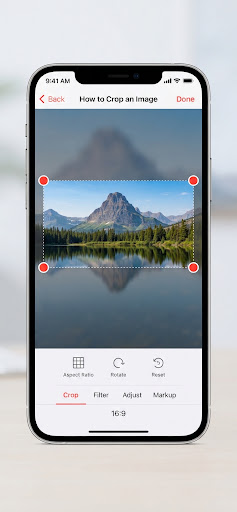
- 3Apply and export
Choose Crop image, then download the result from the queue.
Common aspect ratiosPreset ratios
Choose a preset that matches the destination, or keep the crop freeform for a custom frame.
| Ratio | Common Use | Orientation |
|---|---|---|
| 1:1 | Instagram Posts, Profile Pictures | Square |
| 16:9 | YouTube Thumbnails, Presentations | Landscape |
| 4:5 | Instagram Portraits | Vertical |
| 9:16 | Stories, Reels, TikTok | Vertical (Tall) |
| Platform | Ratio | Best for |
|---|---|---|
| 1:1 | Posts and carousel | |
| Stories/Reels | 9:16 | Vertical video |
| YouTube | 16:9 | Thumbnails |
Checks & PitfallsPre-flight checklist
Rule of Thirds
Keep key subjects at grid intersections for balanced composition.
Over-cropping
Cropping too closely can result in pixelation and loss of sharpness.
Check Resolution
Ensure the final crop area meets the minimum pixel requirements for the destination.
Cutting off limbs
Avoid cropping portraits exactly at joints (knees, elbows, neck).
FAQ
Will I lose quality when I crop?
Cropping removes pixels, and JPEG output is re-encoded so it can change slightly. A deep crop can look blurry when a small remaining area is enlarged, so start with enough source resolution.
What formats are supported by the tool?
The crop tool accepts JPG, PNG, WebP and GIF. Static JPG, PNG and WebP outputs use the same source format; an animated GIF remains an animated GIF with its frames, timing and loop.
Can I undo a crop if I make a mistake?
Yes. Change the crop or draw a new crop before choosing Crop image. After downloading, use the original source to recover pixels removed from the exported copy.